 Meta Business Partner
 WhatsApp API Official
WhatsApp API or Meta Verified: Which Do You Need?
Choose the right WhatsApp setup for your business
Understand how the WhatsApp Business API differs from Meta verification, what each one requires, and which you should arrange first.
- 5-minute setup
- WhatsApp support 24/7
- Indonesian local server


Why Are These Two Terms So Often Mixed Up?
Both come from Meta and both concern business WhatsApp, yet they serve different purposes and carry different requirements.
The API and Verification Are Treated as One
They are assumed to be a single package, when one governs what your account can send and the other concerns the identity of that account.
Badge Benefits Are Often Misread
The verification badge is taken to raise sending capacity or unlock automation, when its role is to confirm the account genuinely belongs to your business.
Businesses Pick the Wrong Solution
Some chase the badge before holding an API account, while others stay on the ordinary app long after their volume has outgrown it.
WhatsApp API vs Meta Verified: The Difference and the Order
Four explanations so you pick the right one, in the right order.
What the WhatsApp API Is
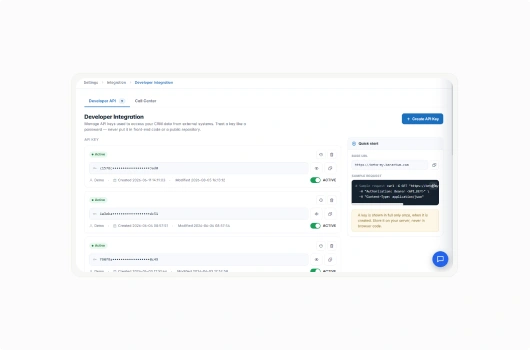
The WhatsApp Business API is the official route for sending and receiving messages at volume, with automation and connections to your other systems.
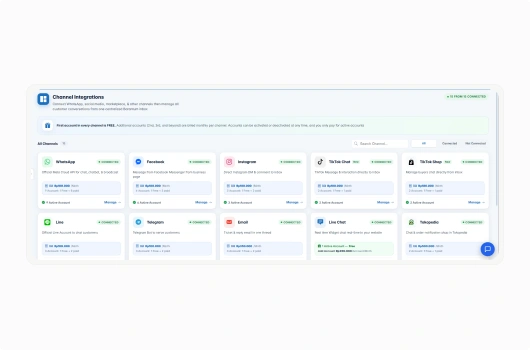
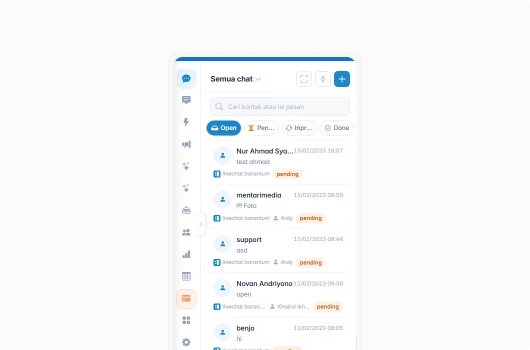
One number can be handled by many agents at once
Incoming and outgoing messages connect to the CRM
Templates and automated replies can be run
An open API is available for specific needs
What Meta Verified Is
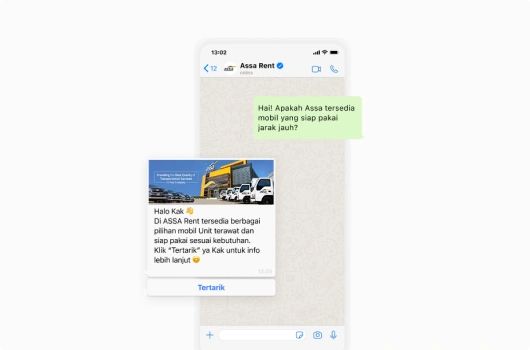
Meta verification is a status marking that the account genuinely belongs to your business, shown as a badge on the WhatsApp profile.
Your business name shows in chats, not a strange number
Customers recognise your genuine account more easily
It helps protect your business name from misuse
It is submitted to Meta and goes through review
Comparing Function and Requirements
They differ in purpose and in requirements. Verification sits on top of an API account rather than replacing it.
The API sets capability, verification sets identity
Verification is only for accounts already on the API
The account must be registered in Meta Business Manager
Meta review takes anywhere from days to weeks
A Recommendation for Your Business
Decide from what you need now: capacity and automation first, then credibility once that is running.
High message volume and many agents, start with the API
Need automation and CRM records, start with the API
Already on the API and want more trust, apply for verification
The Barantum team helps you decide the right order
Why Businesses Handle the API and Verification Through Barantum
One party for both, from connecting the API through to submitting the verification.
Meta Business Partner
Listed in the official Meta partner directory for the WhatsApp Business API.
ISO 27001
Customer conversation data secured to an international standard.
Mobile app
Your team can answer conversations from the iOS & Android app.
24/7 support
Guidance from connecting the API through to the verification request.
Choose a Barantum WhatsApp API Plan That Fits Your Needs
Try every plan for free. Upgrade anytime, no complicated contracts.
Standard
The ideal solution for starting your omnichannel journey
- Integration of 1 WhatsApp number, 1 Facebook account, 1 Instagram account, 1 Telegram number, and 1 Line number
- Smart Chatbot Without Flow Limits. Automate your customer conversations during and outside working hours.
Exclusive to WhatsApp
*Implementation fees apply - Multi Admin Management
- Consumer Contact Data Management
Professional
More complete solution for interaction between Your business and Your customers.
- All Standard plan features with other additional features
- AI Agent
- Integration of 1 Live Chat account
- Workflow Management
Enterprise
Customizable solutions to suit Your business needs with a large number of customers
- All Professional package features with additional optional features
- On-Premise Solutions
- Dedicated Barantum Project Manager
- Support 24 Hours 7 Days
Trusted by 1000+ Businesses in Indonesia
How Barantum helps businesses to increase profits, time efficiency, and customer satisfaction


50%
Improved Customer Response
Barantum Omnichannel increases the productivity of the Oasis team in responding to customer inquiries from many channels.

Andri Dwi Yulianto
Customer Service Assistant Manager
PT Oasis Waters International


85%
Improved Call Center Performance
With the open & close ticket system, we know the percentage of cases handled to ensure maximum service.

Dian Melinda Arifin
Founder
PT Jackal Holidays


90%
Barantum Call Center: Simplifying BRINS Operations
Barantum was chosen as a vendor due to its targeted approach and explanation of features relevant to the operational needs of the BRINS call center.

Nuni Apriana
Project Staff
BRI Insurance


80%
Daily Team Activities Supported
Around 80% of our team’s daily activities are greatly supported, from lead management and tracking to team performance reports.

Aldias Restu Saputro
Edu Care National Coordinator
Sekolah Murid Merdeka


85%
Tada Complaints Are More Structured Using Barantum
Our complaint handling is based on incoming chats. Without a structured system, we cannot receive chats quickly.

Heni Nelawati
CLT & Purchasing Supervisor
Tada


85%
Customer Service Improvement
Barantum helps Rokue boost efficiency by 85% by preventing WhatsApp messages from piling up or being missed.

Inne Rettiani
Sales Marketing Manager
Rokue
Questions About WhatsApp API vs Meta Verified
The WhatsApp Business API determines what your account can do, such as serving many agents on one number, running automation, and connecting to a CRM. Meta verification determines how that account is recognised by customers through a badge on its profile.
The WhatsApp Business API comes first. Verification is only available for accounts already using the WhatsApp Business API, not the ordinary WhatsApp Business App.
No. The badge relates to account identity, not to sending capacity or automation. Both of those come from using the WhatsApp Business API.
The account must already use the WhatsApp Business API, be registered in Meta Business Manager, and your business needs a traceable presence. The Barantum team helps prepare the paperwork.
Review by Meta usually takes anywhere from a few days to a few weeks, depending on how complete the documents are and the review queue at the time.
The decision rests entirely with Meta and cannot be guaranteed by anyone. What can be done is preparing the submission as thoroughly as possible, and that is what the Barantum team assists with.
Yes. A WhatsApp Business API account works fully for serving customers, running automation, and sending broadcasts even before any badge is issued.
Yes. Barantum connects the WhatsApp Business API and also guides the verification request, so you are not dealing with two separate parties.
Unsure Whether You Need the WhatsApp API or Meta Verification?
Tell us your message volume and what your team needs, and we will help you decide the order. Try it free, no credit card needed.
No credit card, quick setup, local Indonesian support
