 Meta Business Partner
 WhatsApp API Official
Automated WhatsApp Reminders for Business
Remind every customer on time
Send staged reminders over WhatsApp before the day itself, cut the number of no-shows, then see the result for every booking made.
- 5-minute setup
- WhatsApp support 24/7
- Indonesian local server


Why Do So Many Customers Fail to Turn Up?
An agreed appointment is still missed when no reminder arrives at the right moment.
Customers Forget Appointments Already Booked
Appointments made well in advance are easily forgotten, and the slot your team set aside ends up empty with no time to offer it to anyone else.
Reminders Are Sent Manually One by One
Staff open the schedule and type a message for each customer, so the busiest days are exactly when the most reminders are missed.
No Proof the Reminder Was Delivered
When a customer does not show up, there is no record of whether a reminder was ever sent, making it hard to judge where the problem lies.
Reminders That Leave on Time by Themselves
Four Barantum capabilities that keep every appointment front of mind without staff sending anything by hand.
Automated WhatsApp Reminders
As soon as an appointment is recorded, its reminders are scheduled automatically and sent over official WhatsApp with no further action from staff.
Sent without relying on staff memory
Every appointment gets a reminder
Keeps running on the busiest days
Sent from your official WhatsApp
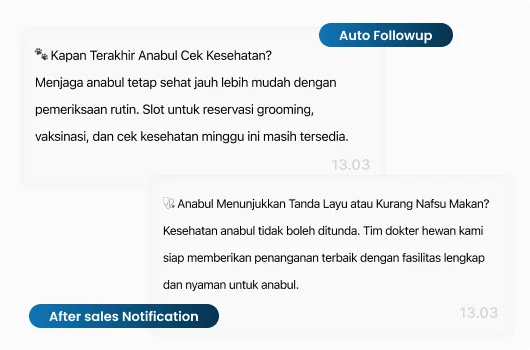
Staged Reminder Scheduling
You decide when reminders go out, for example one the day before and another a few hours ahead of the appointment.
Several reminders per appointment
Intervals you define yourself
Stops by itself once the time has passed
Different rules per service type
Official Templates With Appointment Details
Reminders use official WhatsApp templates, with date, time, and location filled in automatically from the appointment record.
Date, time, and location filled automatically
Consistent format across all staff
Sent over the official WhatsApp Business API
Templates managed in one place


Confirmation and Reminder History in the CRM
Customers can reply to confirm or ask to reschedule, and every reminder sent is recorded on their contact.
Customers confirm with a reply
Reschedule requests land in the inbox
Delivered and read status visible
Reminder history sits on the contact
Why Businesses Choose Barantum for WhatsApp Reminder Automation
More than a reminder sender — there are credentials, apps, and hands-on guidance behind it.
Meta Business Partner
An official WhatsApp Business API partner, so your reminders are sent on legitimate rails.
ISO 27001
Customer data security certified to an international standard.
Mobile app
Your team can track schedules and confirmations from the iOS and Android apps.
24/7 Support
Guidance from setting the reminder schedule through to it running automatically.
Choose a WhatsApp Reminder Automation Plan That Fits Your Needs
Try every plan for free. Upgrade anytime, no complicated contracts.
Standard
The ideal solution for starting your omnichannel journey
- Integration of 1 WhatsApp number, 1 Facebook account, 1 Instagram account, 1 Telegram number, and 1 Line number
- Smart Chatbot Without Flow Limits. Automate your customer conversations during and outside working hours.
Exclusive to WhatsApp
*Implementation fees apply - Multi Admin Management
- Consumer Contact Data Management
Professional
More complete solution for interaction between Your business and Your customers.
- All Standard plan features with other additional features
- AI Agent
- Integration of 1 Live Chat account
- Workflow Management
Enterprise
Customizable solutions to suit Your business needs with a large number of customers
- All Professional package features with additional optional features
- On-Premise Solutions
- Dedicated Barantum Project Manager
- Support 24 Hours 7 Days
Trusted by 1000+ Businesses in Indonesia
How Barantum helps businesses to increase profits, time efficiency, and customer satisfaction


50%
Improved Customer Response
Barantum Omnichannel increases the productivity of the Oasis team in responding to customer inquiries from many channels.

Andri Dwi Yulianto
Customer Service Assistant Manager
PT Oasis Waters International


85%
Improved Call Center Performance
With the open & close ticket system, we know the percentage of cases handled to ensure maximum service.

Dian Melinda Arifin
Founder
PT Jackal Holidays


90%
Barantum Call Center: Simplifying BRINS Operations
Barantum was chosen as a vendor due to its targeted approach and explanation of features relevant to the operational needs of the BRINS call center.

Nuni Apriana
Project Staff
BRI Insurance


80%
Daily Team Activities Supported
Around 80% of our team’s daily activities are greatly supported, from lead management and tracking to team performance reports.

Aldias Restu Saputro
Edu Care National Coordinator
Sekolah Murid Merdeka


85%
Tada Complaints Are More Structured Using Barantum
Our complaint handling is based on incoming chats. Without a structured system, we cannot receive chats quickly.

Heni Nelawati
CLT & Purchasing Supervisor
Tada


85%
Customer Service Improvement
Barantum helps Rokue boost efficiency by 85% by preventing WhatsApp messages from piling up or being missed.

Inne Rettiani
Sales Marketing Manager
Rokue
Questions About Barantum WhatsApp Reminder Automation
WhatsApp reminder automation sends appointment reminders automatically over official WhatsApp. Once an appointment is recorded, its reminders are scheduled on their own and sent at the times you define.
That is up to you. A common pattern is one reminder the day before and another a few hours ahead, but the number and spacing can be adjusted to suit your service.
Yes. Date, time, location, and customer name are filled automatically from the appointment record, so staff never retype them and the risk of wrong details drops.
They can. Customers simply reply to the reminder, and that reply lands in your team inbox on the same contact so it can be acted on straight away.
Reschedule requests arrive as a normal conversation in the inbox. Your team changes the appointment, and reminders for the new time follow the same rules.
Yes. Once an appointment is cancelled or its time has passed, any reminders still pending for it will not be sent.
There is. Every reminder is recorded on the customer contact in the CRM along with its delivered and read status, so it is clear whether the customer received it.
The cost combines a per-user subscription with WhatsApp message rates for the relevant category. See the pricing page for details, or contact our consultant for a calculation based on your appointment volume.
Ready to Cut Down on Missed Appointments?
WhatsApp reminders that send themselves, staged ahead of the day, carrying the appointment details, with the history kept in your CRM. Try it free, no credit card needed.
No credit card, quick setup, local Indonesian support
